Apps · · 4 min read
Shopify Knowledge Base app: what AI says about your store
The Shopify Knowledge Base app is being replaced. Where your store facts for AI agents live now, how to check what AI says about returns, and what to fix.
By Nikita Ahapov · Updated
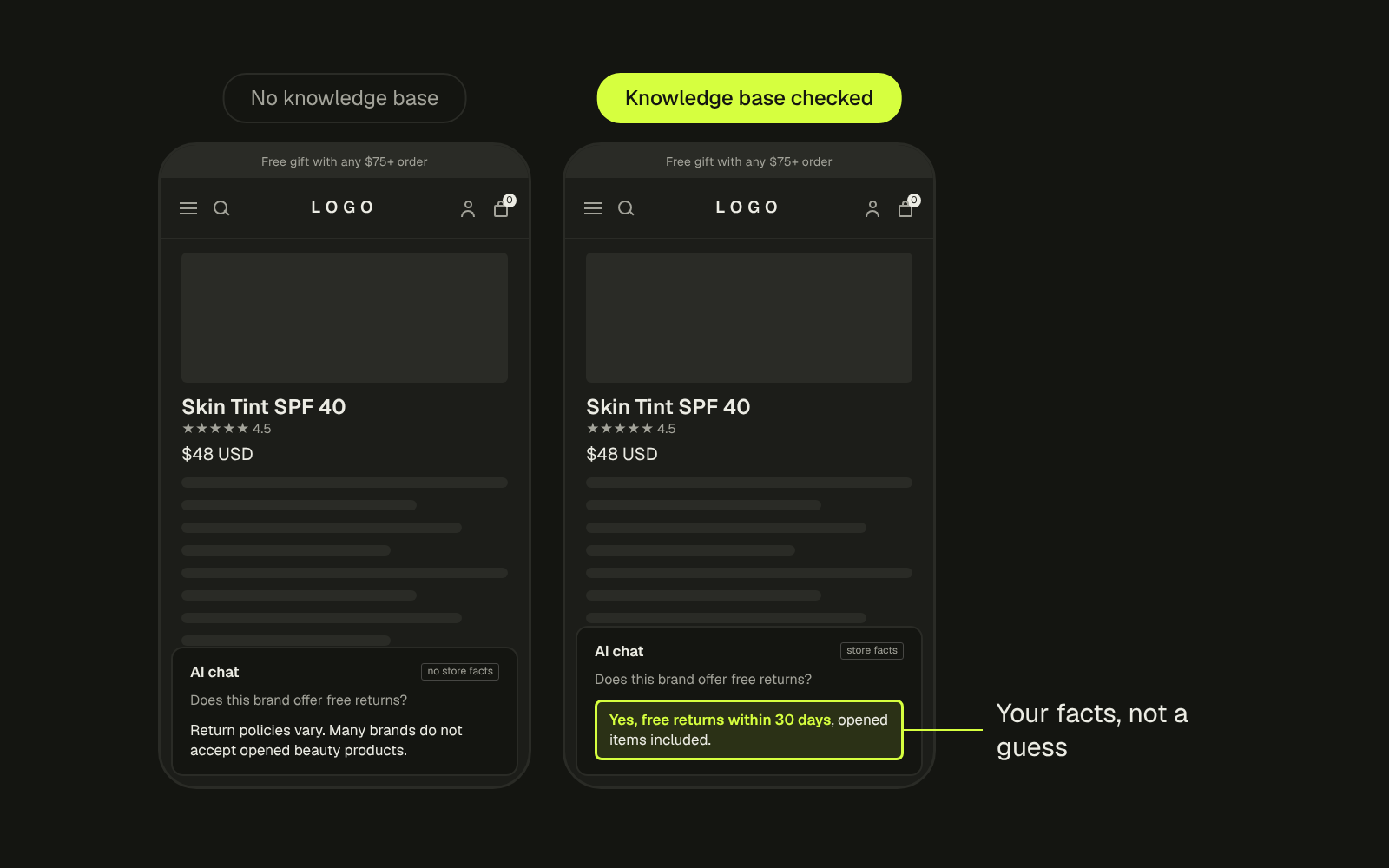
The Shopify Knowledge Base app was the free way to control what AI says about your store. It is now being replaced, and the facts you care about have moved to a new place in your admin.
AI is already answering questions about your store. “Does this brand offer free returns?” “How long is shipping?” The AI pulls an answer from somewhere. If that answer is wrong, you lose trust before the shopper ever visits your site.
The problem
A shopper asks an AI assistant about your return policy. You never see the question and you never see the answer. If the answer says 14 days and your policy says 30, or says you ship worldwide when you ship to two countries, the shopper either walks away or arrives expecting something you do not offer.
Even Shopify’s own generated facts need checking. One review on the Knowledge Base app listing says the tool sometimes invents answers, including a made up URL. Auto generated facts are a starting point, not something to trust blind.
Why it happens
AI agents answer from whatever they can find. Shopify’s answer was a set of store facts that agents can treat as a trusted source. In Shopify’s words, your FAQs “aren’t displayed directly on your storefront”, they serve as a trusted data source for AI platforms. (Shopify Help Center)
The app built those facts from your store settings: language, customer accounts, shipping and delivery, and return rules. You could review each one, override it, or add your own. (Managing your store FAQs)
Here is what changed. Shopify says the knowledge base in its agentic storefronts is replacing the Shopify Knowledge Base app. The app can no longer be installed from the Shopify App Store, and it is deprecated on 15 January
- If you had 1,000 or fewer facts, your overrides and added facts move over automatically. If you had more, you have to add them to the new knowledge base yourself before that date.
So if you set the app up and forgot about it, check that your facts arrived. If you never set it up, the new knowledge base is where to start.
Where the knowledge base lives now
The new knowledge base sits under Sales channels > Agentic, in the Sources section. It holds the non product information about your store, such as your return process, shipping timelines and brand values. (Shopify Help Center)
Each field has one source: a scan of your storefront, a place in your Shopify admin such as your shipping settings or policies, or text you type in manually. Shopify says it never changes knowledge base content on your behalf, so suggested updates wait for your approval. Your published knowledge base is also publicly available through the Storefront MCP, so write it as if anyone can read it, because anyone can. (Answering customer questions with your knowledge base)
How to check your own store
- In your Shopify admin, go to Sales channels > Agentic and open the knowledge base.
- Read the return and shipping facts first. Compare each one with your actual policy page and your shipping settings, word by word: the return window, who pays for return shipping, which countries you ship to.
- Look at the source of every fact you rely on. If it comes from a storefront scan, make sure the page it was scanned from is current.
- Check for suggested updates waiting for approval. Approve the correct ones and reject the wrong ones.
- Then ask an AI assistant the questions your support inbox gets every week and see what comes back.
If your store is password protected, the knowledge base cannot reach your online store and only shows data from your Shopify admin. Keep that in mind before launch.
How to fix it
Fix the source, not just the answer. If a fact is wrong because your returns page is out of date, update the page. The help page says to edit the relevant page or section in your admin to change referenced information. Then request a rescan, which can take up to 48 hours.
For things no setting covers, add them as additional facts. Good candidates are the questions people ask before buying: gift wrapping, international duties, how long a made to order item takes, whether you price match. Keep each answer short and specific. The knowledge base holds up to 1,000 facts, generated ones included, so you will not run out.
Do not stop at returns and shipping. Brand values, sizing help and care instructions are the kind of thing an AI will happily make up if you do not give it the real answer.
What I do
On a store review I now read the knowledge base the same way I read the policy pages. Every fact has to match what the store actually does, and every fact needs a source that will stay correct when the policy changes.
This is the same habit as checking which apps still load on your store after you remove them. Things you set up once and forgot are the ones that cost you. Here is how to safely uninstall a Shopify app without leaving that kind of mess behind.
Want me to check what your store tells AI agents? Send me your store and I will go through it with you.