Analytics & CRO · · 4 min read
Shopify agentic storefronts: AI agents read your catalog
Shopify agentic storefronts put your products in AI channels like ChatGPT. What agents read, how to check your store, and what I fix first in the catalog.
By Nikita Ahapov · Updated
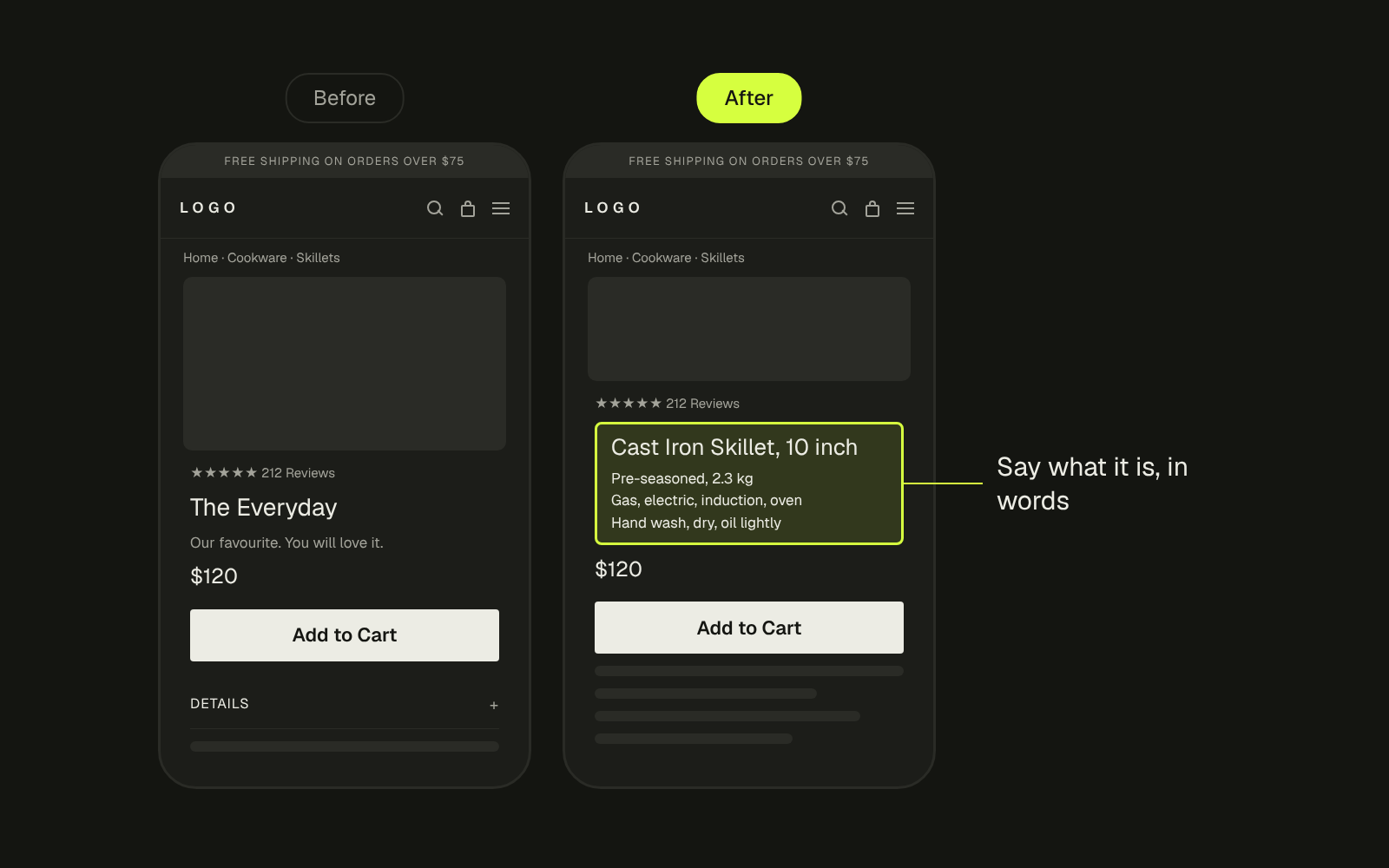
Shopify agentic storefronts are now a sales channel in the admin, and I saw it for the first time on a real store I work on. Under Sales channels there was a new entry: Agentic. Shopify turns it on by default for eligible stores, so plenty of merchants are in it without knowing.
That is the part worth paying attention to. AI agents are already reading your store. Not your homepage design or your hero banner. Your product titles, your descriptions, your options and your policies.
What the Shopify agentic sales channel is
Shopify describes agentic storefronts as a way to let customers discover and purchase your products in AI channels: ChatGPT, Google AI Mode and Gemini, Microsoft Copilot, and Meta. It is active by default for eligible stores, so you do not need to turn it on. (Shopify Help Center)
To be eligible, your products need to be eligible for Shopify Catalog, and you need a completed Terms of service, Privacy policy, and Return and refund policy in Settings, Policies. Each AI channel adds its own requirements, such as the countries you sell to.
Since May 2026 it has its own page in the admin, where you can see performance across AI channels, the queries you show up for, and suggestions for your product data. (Shopify changelog)
What AI agents actually read
Your products reach these channels through Shopify Catalog. Shopify’s help page lists what goes in by default: title, description, options, images, price, availability, and other key attributes, structured so AI agents can parse them. (Shopify Help Center)
So the agent sees what you typed into the product form. It does not see the lifestyle photo with the clever headline, or the comparison table your developer built as a theme section. If the size, the material or who it is for only lives in an image or a custom section, assume the agent does not know it.
Questions that are not about a product, like returns or shipping times, come from your knowledge base. Shopify calls it the source of truth for AI agents for all non product information about your store. I wrote about checking what AI says about your returns when that moved into this channel.
Why vague catalogs lose here
On your own site, a weak title is rescued by everything around it. Photos, reviews, the brand. A shopper scrolls and works it out.
An agent compares your listing with every other listing that might answer the question. A product called “The Everyday” with a two line description that says “our favourite, you will love it” tells it almost nothing. A product called “Cast iron skillet, 10 inch” with the weight, the cooktops it works on and the care steps written out answers the question someone actually asked.
Shopify’s own tool says as much. For products that do not rank, it points to things like missing product descriptions, not enough relevant images, or incomplete variant data. (Shopify Help Center)
How to check your store
- In your Shopify admin, go to Sales channels, Agentic.
- Under Sources, look at Shopify Catalog. If your store is eligible, it shows how many of your products are in it. If not, it shows Ineligible, and you can click it to see why.
- Type a real search into the field “Enter a search query to see how you might rank”. Use the words a customer would use, not your product names.
- Look at the Listing quality indicator and Listing insights for your products in the results, then open Improve your listing.
- Under Sources, open Knowledge Base and read every fact about returns and shipping. Compare it with your actual policy pages.
Shopify says the preview is a directional signal, not an exact prediction, because each AI channel ranks results with its own logic. Treat it as a checklist, not a scoreboard.
How to fix what agents read
- Titles that say what the product is. Keep the brand name for the product if you like, but add the plain words: material, type, size.
- Descriptions with facts, not mood. Dimensions, materials, what is in the box, how to care for it, who it is for. Write them as text in the description, not inside images.
- Clean options. Consistent option names and values, so “Size” is not “Size” on one product and “Sizes” on another. If your variants are set up as separate products, Shopify lets you group them so they show as one listing.
- Finished policies. All three required policies filled in, and matching what your knowledge base says.
None of this is new advice. It is the same work that helps your own site search and Google. The difference is that an agent will not scroll past a weak title to find the good stuff.
Can you turn off agentic storefronts?
Yes. In Sales channels, Agentic, deactivate “Allow Shopify to manage for me”, then deactivate “Shopify Catalog access” and click Save. That removes Catalog access for third party channels, but Shopify notes it does not remove your products from Shop. To hide a single product from all AI channels, the help page says to set it to Unlisted, which also hides it from sitemaps, search engines and your own store search.
I would not turn it off. I would fix what it reads.
What I do
On a store audit I now open the Agentic page right after the analytics. I run five or six searches a real customer would type, see which products come up, and list the ones with weak listings. Then I rewrite titles and descriptions for the bestsellers first and check the knowledge base against the policies.
If you want a second pair of eyes on how your catalog reads to an AI agent, send me your store.