Analytics & CRO · · 4 min read
Shopify email popup: ask about the problem first
A Shopify email popup that only says Get 10% off gets closed. Ask what the shopper needs first, then the email, then the products that fit.
By Nikita Ahapov · Updated
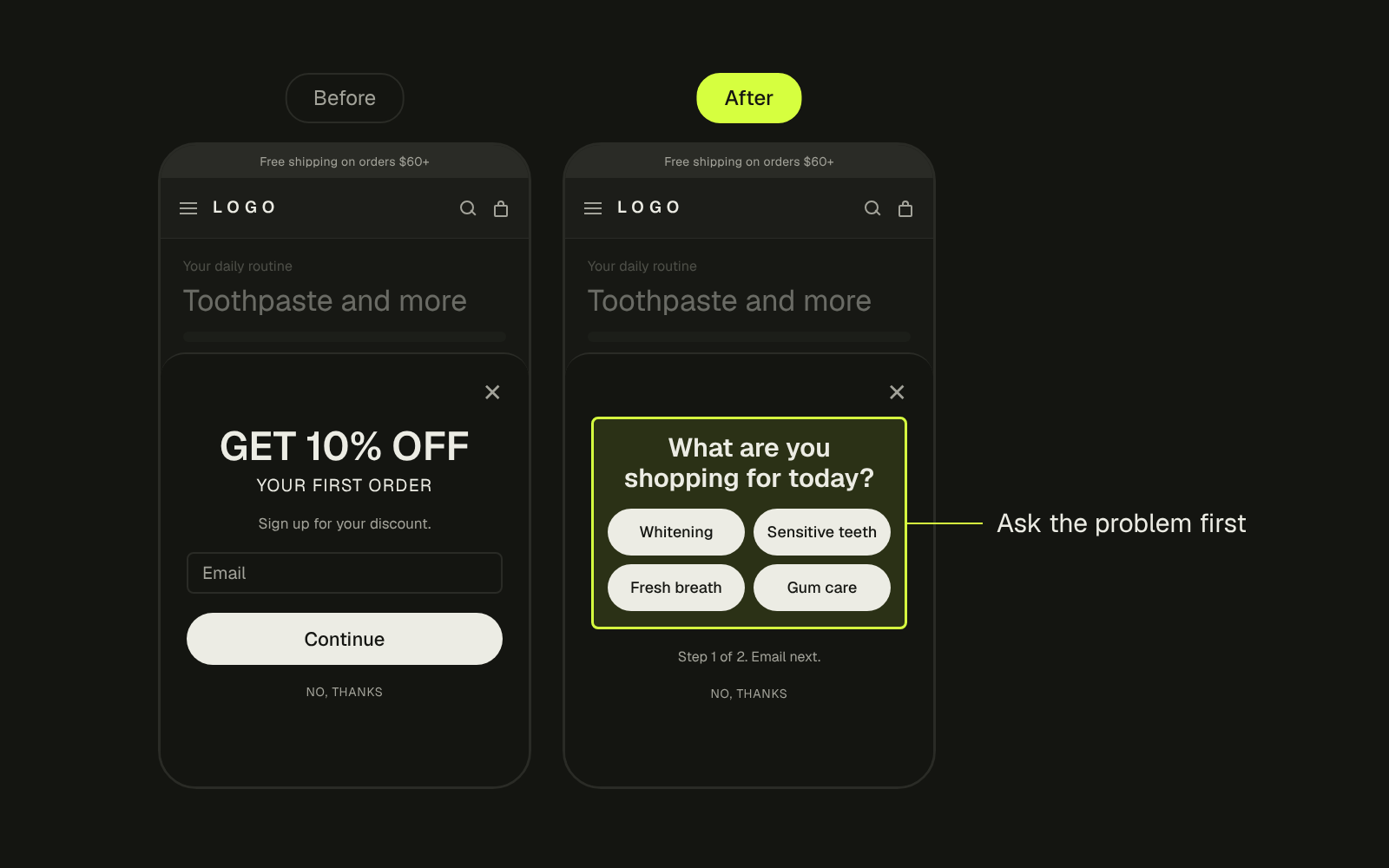
The typical Shopify email popup asks for the same thing in the same way: “Get 10% off” or “Join our newsletter”, and an empty email field. That is where a lot of stores lose people. Not because visitors hate email. Because the ask is generic.
People do not wake up wanting to give a store their email address. They do want help deciding what to buy. So the popup that works better asks about the problem first.
The problem with the 10% off popup
A shopper lands on your home page from an ad or a search. Before they have seen a single product, a sheet slides up over the page asking for their email. The only thing on offer is a discount on something they have not chosen yet. On a phone that sheet can cover most of the screen, so the easiest move is the X.
Nielsen Norman Group’s advice on popups is blunt: “never show a popup before users can glean value from your website or application.” They recommend the reciprocity principle: give visitors value before you ask them for anything. (Nielsen Norman Group)
Google says something similar from the search side. Its guidance describes intrusive dialogs as page elements that obstruct the view of the content, and suggests banners that take up only a small fraction of the screen instead. (Google Search Central)
Why a question works better than a discount
A discount is about the price. A question is about the shopper. “What are you shopping for today?” with three or four clear options is one tap, no typing, and every option sounds like help.
Once they tap their problem, the email ask makes sense: “Want the routine for sensitive teeth? Where should we send it?” And after the email, show them products for that problem, not your bestsellers.
The answer is worth something to you as well. Klaviyo calls this zero party data, “information a customer intentionally and proactively shares, like a quiz answer”, and describes those answers becoming profile properties that a merchant uses for segmentation and personalization. (Klaviyo developer docs) So the welcome emails can talk about the thing they told you, instead of a generic brand story.
Reducing decision friction is the whole trick. You are not hiding the email ask. You are earning it.
How to check your own Shopify popup
- Open your store on your phone in a private window, so the popup treats you as a new visitor.
- Note when it appears. If it shows before you can see what the store sells, it is too early.
- Read it as a stranger would. Does it say anything about you, or only about the discount?
- Look at how much of the screen it covers and how easy the close button is to hit.
- Open your email platform and look at a few new subscribers. If all you know about them is an email address, the popup is not telling you anything.
How to build a quiz popup on Shopify
Three steps, in this order: the question, the email, the products.
- Step 1: the question. One question, three or four options written in the shopper’s words. “Sensitive teeth”, not “Desensitizing range”. No email field yet.
- Step 2: the email. Now ask, and tie it to their answer. Keep the discount if you want, but it is no longer the headline.
- Step 3: the products. Show or link to the products for the problem they picked.
Check your tool before you plan this. Shopify’s free Forms app is fine for a plain signup, but its help page says multi step forms aren’t supported and conditional logic isn’t supported either. (Shopify Help Center)
Klaviyo’s sign up forms can do it. Its help center describes a pre engagement step to “get buy-in from your visitors before asking them for any information”, followed by a step that asks for the email address or phone number. If you collect profile properties before the contact details, Klaviyo keeps the responses and ties them to the subscriber once they submit their email or phone number. A form can have up to 4 pages plus an optional success message. (Klaviyo Help Center) Dedicated quiz apps go further, with a full product recommendation quiz on its own page.
If you swap popup apps along the way, remove the old one properly so its code does not keep loading. Here is how to uninstall a Shopify app safely.
What I do
On an audit I open the popup on a phone first, because that is how most shoppers meet it. Then I rewrite it around the three or four problems the store actually solves. The options come from the store’s own data: top search terms, top collections, the questions customer service answers every week. If the site search is weak, that is the next thing I look at, since it is the other place shoppers tell you what they need.
Not sure what your popup should ask? Send me your store and I will tell you what I would put in it.