Analytics & CRO · · 4 min read
AI conversion rate optimization: it can't pick what matters
AI conversion rate optimization looks easy in a prompt. Why \"make this CRO best practice\" fails on Shopify, and the context AI needs before it edits a section.
By Nikita Ahapov · Updated
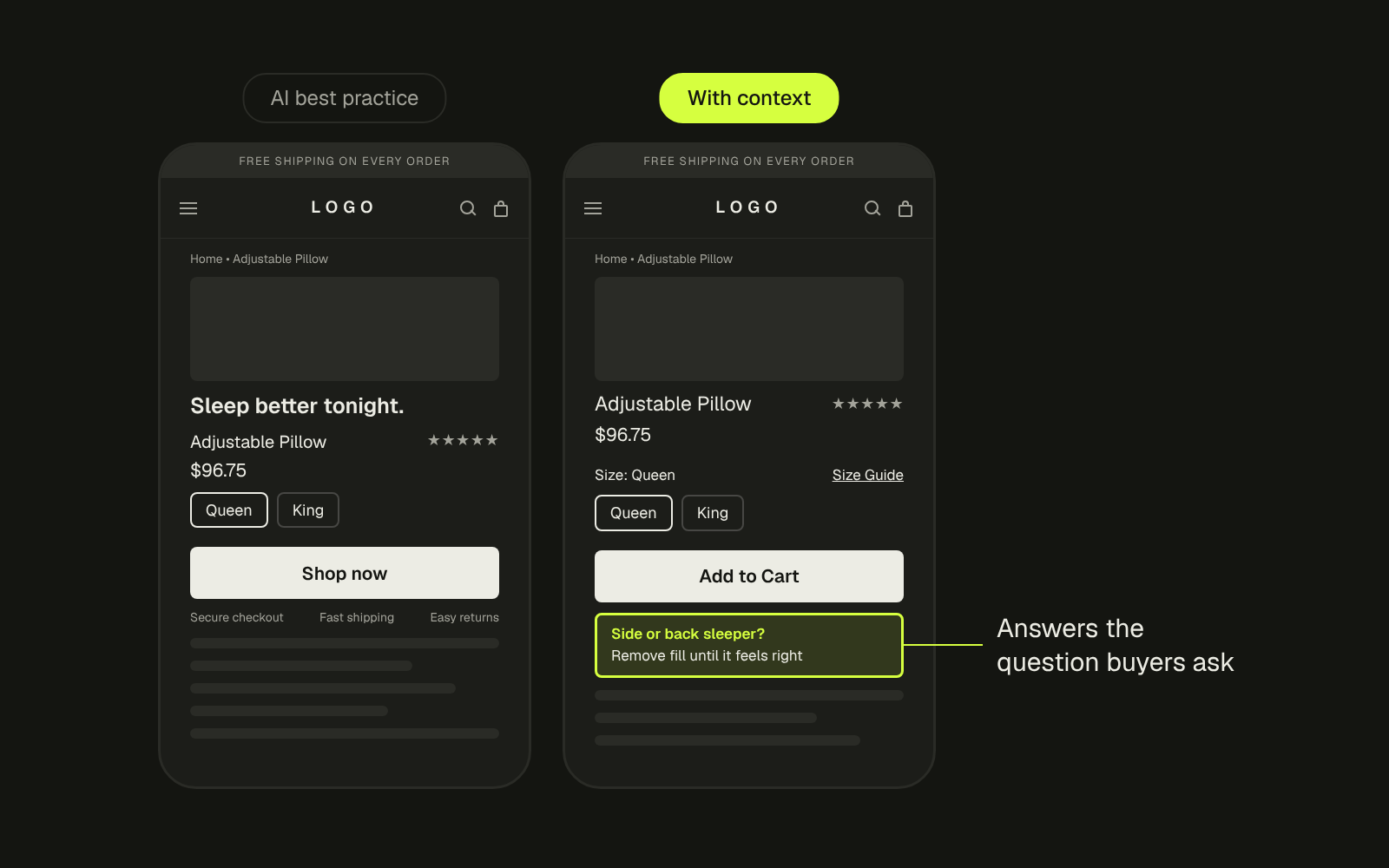
AI conversion rate optimization sounds like a shortcut. I tried it the lazy way. I gave Claude a product page section and wrote: “Make this section CRO best practice.”
It came back with a clean layout, better hierarchy and a stronger call to action. Technically correct. Completely useless.
The problem: best practice with no context
Nothing in the new section was wrong. It just did not answer anything. I had not told it who buys, on what device, what has been tested before, which apps break the page, or where shoppers actually get stuck. So it gave me the average of every product page it has seen.
That is the trap. The output looks like an improvement, so it is easy to ship. But a section that looks better and a section that sells better are not the same thing.
Why it happens
A prompt like mine asks the model to decide what matters. It cannot, because the answer is not in the screenshot or the code. It is in your data and your customers.
Baymard tested this back in 2023. They gave GPT-4 screenshots of 12 ecommerce pages and compared its suggestions with those of six of their own UX benchmarkers. About 20% of its suggestions were accurate, and 80% were false positives. It told sites to make their pages mobile responsive when it had only seen desktop screenshots, and recommended features a page already had. (Baymard)
Models have improved since then, but the newer picture is still not great. In a 2025 article Baymard writes that public tests of generative AI tools and premade prompts for UX or CRO suggestions show accuracy rates of just 50 to 75%. Their point is simple: it is very hard to tell good UX from bad UX just by looking at the UI. (Baymard)
Even at 75%, one suggestion in four is wrong, and the AI says all of them in the same confident voice.
CRO best practices are a starting point, not a decision
I use best practices every day. They tell you what usually works. They do not tell you which problem your store has right now.
On one store the friction is a size question nobody answers. On another the add to cart button is hidden behind a chat bubble on mobile, which I wrote about here. On a third it is trust, and no layout fixes that. I covered why in the post on AI built stores. The same prompt gives all three the same answer.
How to check before you prompt
This is what I gather before I let AI touch a section. It is a short Shopify CRO audit, and most of it is already in your admin.
- Who visits, and on what. Shopify’s reports show which devices sessions come from and which page each session starts on. (Shopify Help Center) If most of your traffic lands on product pages from a phone, redesigning the desktop homepage is the wrong job.
- Where they drop. The same reports have a conversion funnel: sessions with cart additions, sessions that reached checkout, sessions that completed checkout. A big drop before the cart is a product page problem. A big drop after it is not.
- What has been tested. Write down what you already tried and what happened. If you have not tested anything yet, Shopify now runs native A/B tests with Rollouts.
- What breaks the page. Open the page on your own phone. Look for app widgets covering buttons, popups on arrival and blocks that load late.
- The real question. Read your support inbox and reviews. The question customers ask before they buy is usually the friction point.
How to fix it
Then use AI for what it is good at: doing the work fast once you know what the work is.
Instead of “make this CRO best practice”, give it the decision and the context. For example: “Most of our buyers are on mobile and land here from ads. The top pre-sale question is which size to pick. Add a one line answer under the add to cart button, keep the current styles, and do not move the price.”
That prompt gets a useful result, because you already did the part AI can’t: you decided what matters. And the result still goes on a duplicate theme first, gets checked on a real phone, and ideally gets tested before it is published.
What I do
I use AI every day to write Liquid, draft copy and build variations of a section. It saves me hours. What I don’t do is ask it what to change. That comes from the data, the support inbox and the store on my own phone.
AI can rewrite a section. It can’t tell you what to change. Use it to execute faster, not to decide what matters.
If you want someone to find the one thing worth changing on your store, send me your store and I will tell you where I would start.